
RAISE. SIGN. REPORT.
The investor portal for private capital raises
Subscription documents signed online and checked by AI before you approve them. A private page for every investor. Payouts, K-1s and your CPA's workbook without the spreadsheet.
Most raises still run on email and one person's spreadsheet
CapitalPro keeps the whole raise in one place, from the first subscription packet to the K-1 three years later.
Subscription packets
PDFs emailed back and forth, wrong boxes ticked, a page missing
Signed online with their name already filled in, then checked by AI before you approve
Who's in, for how much
A spreadsheet only one person trusts
Built from the raise's Google Drive folder and kept current every six hours
Chasing paperwork and wires
Remembering who to nudge, and when
Reminders lined up for your OK, or sent on a schedule you set
Payouts
A waterfall model nobody else can follow
Capital back first, carried interest taken, each investor's check shown on their page
Tax season
Forty K-1s attached to forty emails
Drop the K-1s in, each one finds its partner. Your CPA gets one workbook
Signed online, checked by AI, approved by you
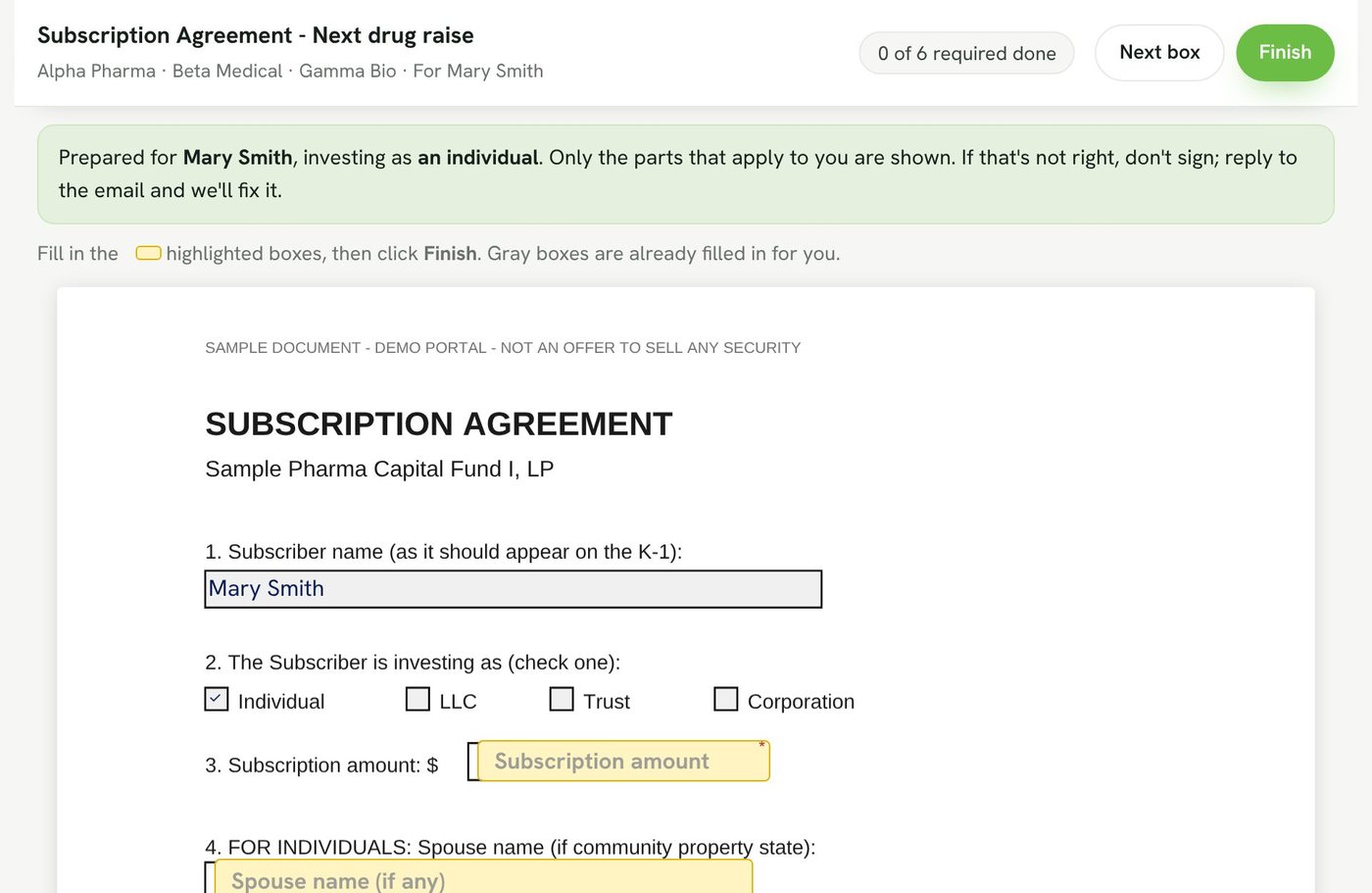
Investors sign on their phone or laptop. Their name and how they're investing are filled in, and they only see the sections that apply to an individual or to an entity.
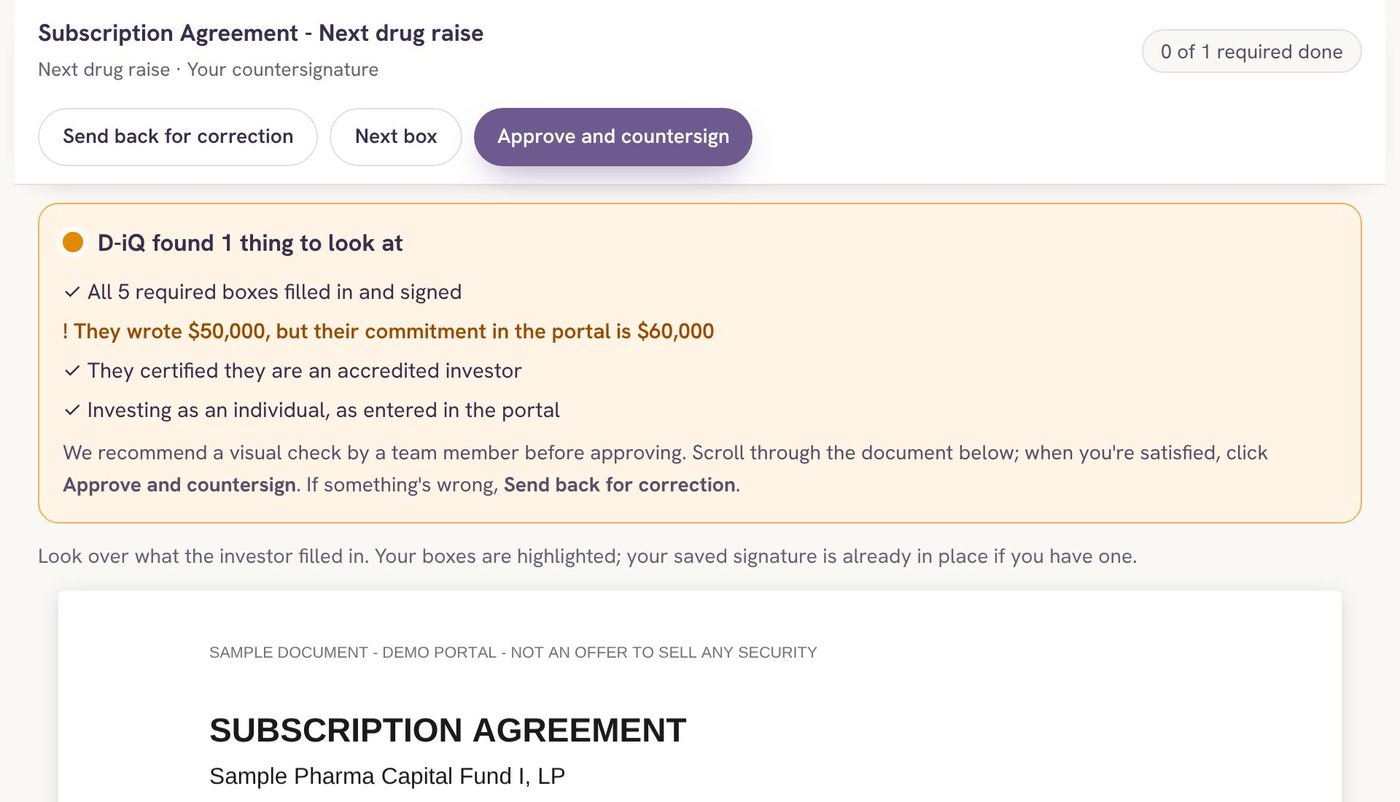
- Every required box filled and signed
- The amount matches their commitment
- Accredited status and entity type agree with the portal
D-iQ, our AI engine, runs these checks the moment they sign. Someone on your team then gives it a look and clicks approve. Your signature goes on, and the signed copy is filed and emailed with a signing certificate.
Point it at the raise's folder
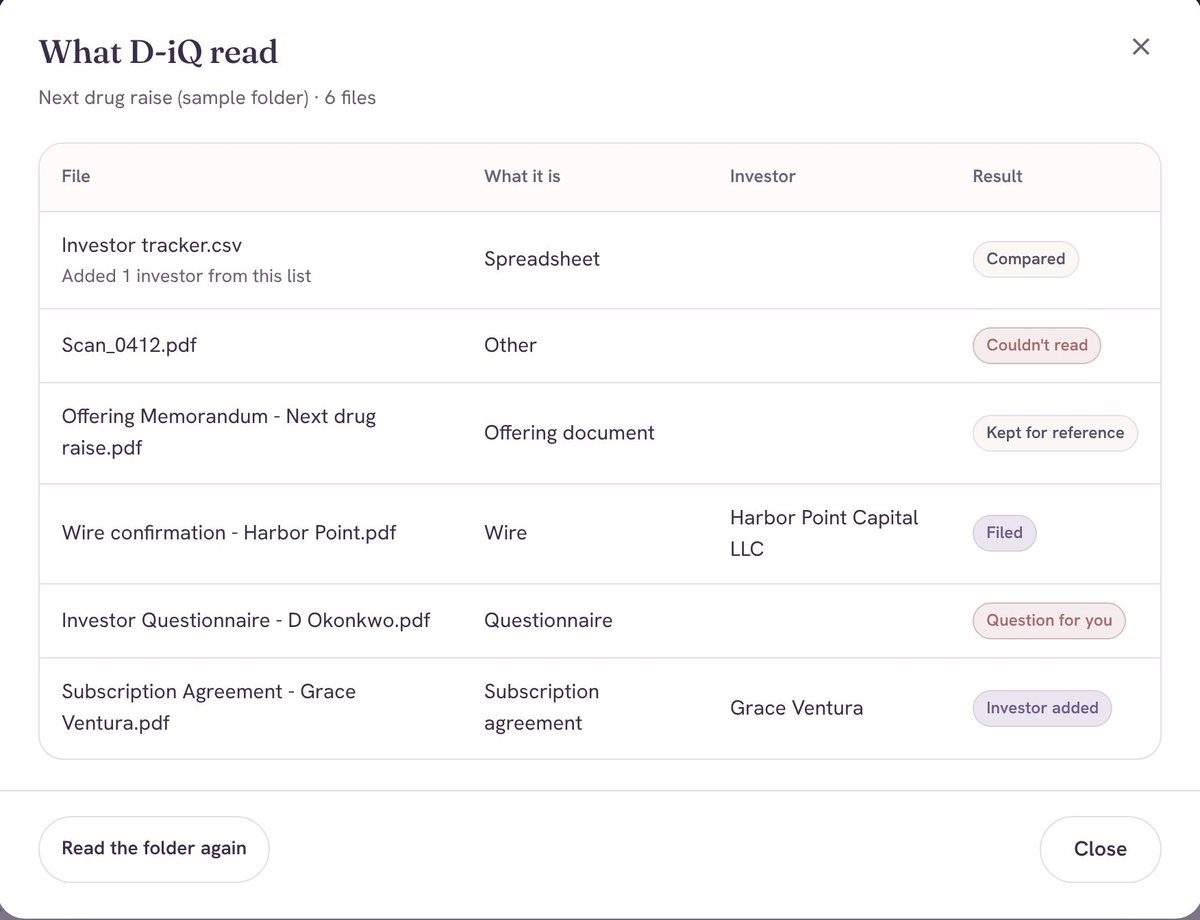
Drop subscription agreements, questionnaires, wire confirmations and your investor tracker into the raise's Google Drive folder. D-iQ, the AI engine from easyNow.life, reads each one, files it under the right investor, adds new investors from your spreadsheet, and asks you when it isn't sure.
- Runs every six hours, or when you click Run now
- Questions come to you in plain English
- Duplicates and junk files are skipped
Every investor gets their own page
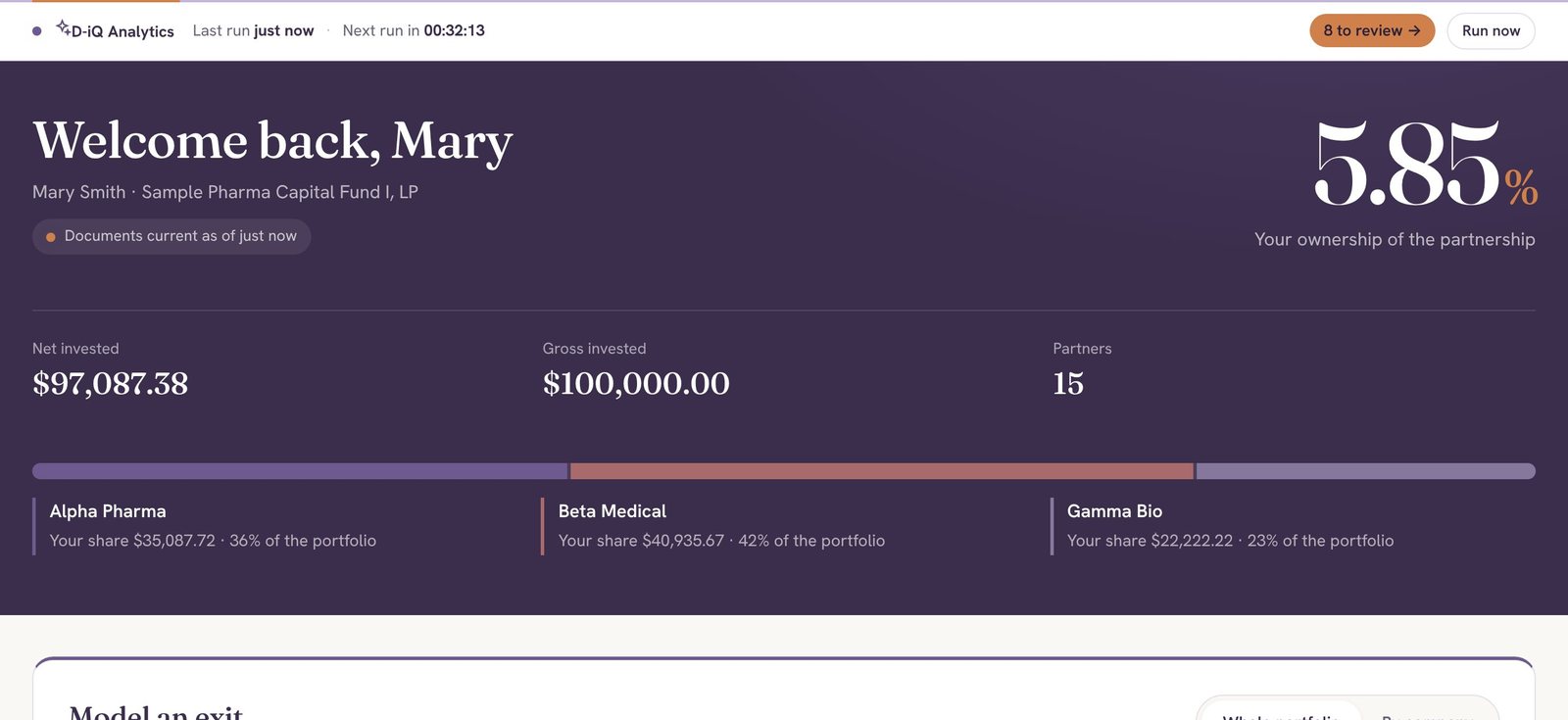
What they own, what they put in, which companies they hold, and every document, payout and K-1, all in one place. They sign in with a link sent to their email, so there's no password to forget.
- An exit calculator for "what if it sells for…"
- Only their own records, never anyone else's
- Works the same on a phone
Payouts with the carry already worked out
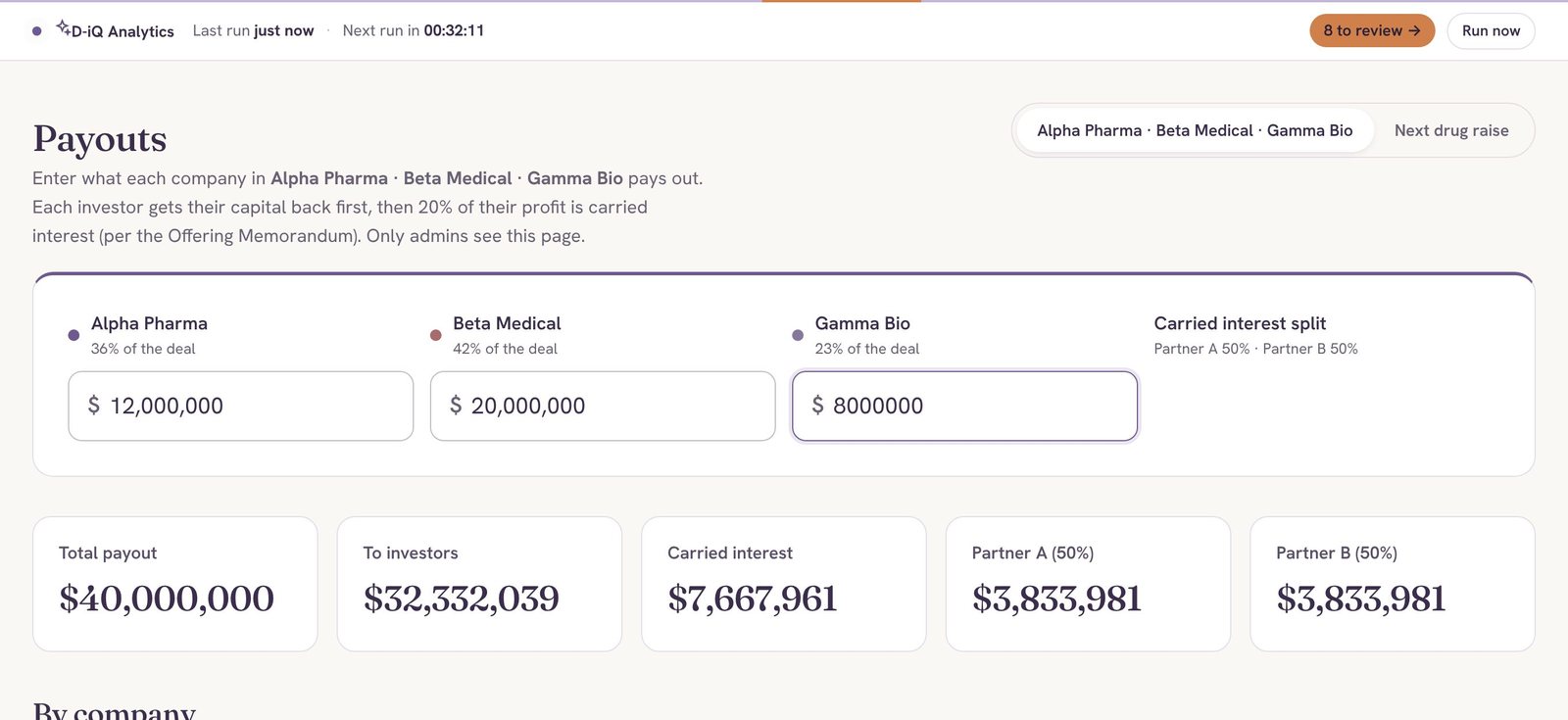
Enter what each company sells for. CapitalPro returns capital first, takes the carried interest, splits it between your partners, and shows every investor exactly what they receive.
- Handles several exits in the same deal
- Recorded payouts appear on each investor's page
- Statements generated for every partner
Everything else a raise needs
Built around how small funds and syndicates actually work, by people who raise money themselves.
Reminders on your terms
Paperwork, signatures and wires that are late get a reminder. You approve each one, or let them go out on a schedule.
A Monday summary
One email each week: what came in, what's waiting for you, and who's behind.
K-1s to the right partner
Upload a stack of K-1s. Each one is matched to its investor and shows up on their page.
A workbook for your CPA
Partners, contributions, distributions and expenses in one spreadsheet, ready for the tax return.
Receipts and expenses
Fund expenses pulled from your inbox and kept with the deal they belong to.
Private deals
Keep a raise visible only to the people in it, and to your admins.
Your name on everything
Your logo and colors on every page. Emails go out as your firm, and replies come back to you.
Your own web address
Run it at portal.yourfirm.com, or at a CapitalPro address we set up for you.
Admins and viewers
Give a partner full control, or let an assistant see everything without changing anything.
How a raise runs on CapitalPro
We set up your first raise with you, including your subscription agreement, so investors can sign it online.
Open the raise
Name it, set the goal and the carry, and connect its Google Drive folder.
Load your investors
D-iQ builds the list from your tracker and the documents in the folder.
Send to sign
Pick the investors and the documents. Each person gets a private link.
Review and countersign
Check the AI's green or amber light, approve, and your signature is applied.
Close and report
Track the wires, then payouts, statements and K-1s for years after.
Your investors' information stays yours
Your investor list is the most valuable thing your firm has. CapitalPro is built so it never sits next to anyone else's.
A separate database per firm
Every firm gets its own portal and its own database. Nothing is shared between clients.
No passwords to steal
Investors and admins sign in with a one-time link sent to their email.
Each investor sees only their own
Ownership, documents and payouts are visible to that investor and your admins.
A certificate on every signature
Who signed, when, from where, and the document's fingerprint, under the U.S. ESIGN Act.
Every change recorded
Sign-ins, approvals and edits are written to an activity log.
A person approves
The AI flags and suggests. Nothing is countersigned until someone on your team says so.
Questions firms ask
Is a signature in CapitalPro legally binding?
Electronic signatures are recognized under the U.S. ESIGN Act. Every signed copy ends with a signing certificate showing who signed, when, from which device and IP address, and a fingerprint of the document, so you can show it wasn't changed afterwards.
Do our investors need to create an account?
No. They enter their email and get a sign-in link, or they open the private link in an email from you. There's no password to set up or forget.
Who sets it up?
We do. We load your investors, connect your deal folders, and map the fields on your subscription agreement so it can be signed online. Your team doesn't need to be technical.
Will it look like our firm?
Yes. Your logo and colors are on every page, emails go out under your firm's name with replies coming back to you, and the portal can run at your own web address. A small "Powered by CapitalPro" line sits at the bottom.
What is D-iQ?
D-iQ is the AI engine behind CapitalPro, built by easyNow.life. It reads your documents and spreadsheets, checks every signed agreement, and turns your raise data into plain-English answers. See how D-iQ works.
Does the AI email investors on its own?
Only if you choose that. By default every reminder waits for your approval, and nothing is countersigned until a person on your team approves it.
We already have investors from earlier deals. Can they come in too?
Yes. Drop your past subscription documents and your tracker into a folder and D-iQ reads them in, including closed deals and their payouts.
What does it cost?
It depends on how many raises and investors you have and how much setup you'd like us to do. Book a walkthrough and we'll give you a price on the call.
See it with your own documents
A 20-minute walkthrough on a sample fund. Bring a subscription agreement and we'll show you how it signs online.